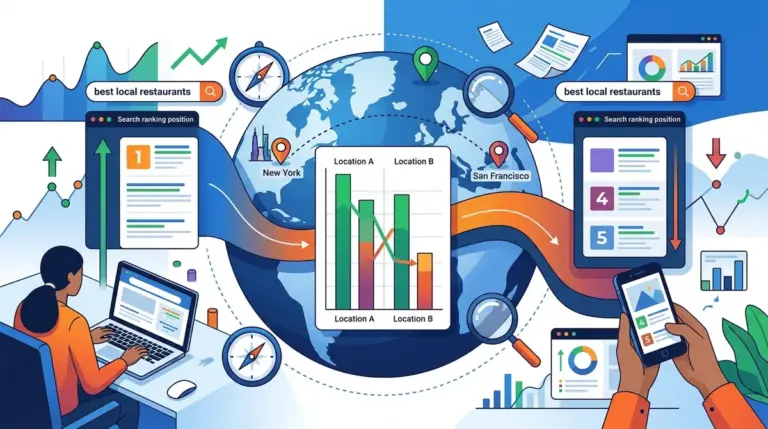
Tracking "near me" search queries is fundamentally different from monitoring standard organic keywords. When a user types "coffee shop near me" or "plumber near me," Google does not return a static list of results based on national or even city-wide authority. Instead, the search engine utilizes the user’s precise geolocation—often down to a few hundred feet—to generate a hyper-local set of results. For SEO professionals and agency owners, this means that tracking rankings at a city level is no longer sufficient. To capture accurate data, you must simulate the exact physical presence of a user in specific neighborhoods or commercial hubs.
The Mechanics of Proximity-Based Search
Google’s algorithm for local intent relies on three primary pillars: relevance, prominence, and proximity. While relevance and prominence can be influenced through traditional on-page SEO and backlink profiles, proximity is a fixed variable determined by the user's coordinates. "Near me" searches are essentially a proxy for "show me what is closest to my current GPS location."
Standard rank tracking tools that only offer "City, State" level targeting will provide a generic average that likely misses the nuances of the Local 3-Pack. In a dense urban environment, a business might rank #1 for a "near me" search when the user is two blocks away, but drop to #8 when the user moves just half a mile south. This volatility is why precise coordinate tracking is the only way to measure the true visibility of a brick-and-mortar business.
Configuring Rank Tracking for Hyper-Local Intent
To get actionable data, your tracking setup must mirror the physical reality of your target audience. This involves moving beyond keyword strings and into geospatial data points.
Utilizing Latitude and Longitude Coordinates
The most accurate way to track "near me" rankings is to provide your tracking software with specific latitude and longitude coordinates rather than just a zip code. Zip codes cover too large an area to reflect the competitive landscape of local search accurately. By setting multiple tracking points around a business location—such as north, south, east, and west of the storefront—you can see the exact radius where your "near me" visibility begins to degrade.
The Role of the Local Pack vs. Organic Results
"Near me" searches almost always trigger a Local Pack (the map with three business listings) at the top of the SERP. You must track these separately from the standard organic blue links. A business may rank #1 in the Local Pack but #12 in the organic results for the same query. Tracking both allows you to see if your local optimization (Google Business Profile) is doing the heavy lifting or if your website’s organic authority is contributing to your local presence.
Warning: Never rely on "near me" data gathered from a desktop browser without a cleared cache and a spoofed location. Google uses your search history and account data to personalize results, which will skew your perception of actual rankings. Always use a dedicated rank tracker that utilizes clean, API-based location spoofing to ensure the data is objective.
Advanced Segmentation for Local Keywords
Not all "near me" searches are created equal. To provide value to clients or stakeholders, you should segment your tracking into specific categories that reflect user behavior.
- Service + Near Me: These are high-intent transactional queries (e.g., "emergency dentist near me").
- Product + Near Me: These often trigger "See What's In Store" (SWIS) features and local inventory ads.
- Brand + Near Me: Essential for franchises to ensure the closest location is the one appearing, rather than a competitor or a more distant branch.
Best for: Multi-location brands and service-area businesses (SABs) that need to identify "dead zones" where their competitors are outranking them despite similar physical proximity.
Mobile vs. Desktop Variance in Local Search
The vast majority of "near me" searches occur on mobile devices. Google prioritizes the mobile experience for these queries, often shortening the results or emphasizing click-to-call and direction buttons. If you are only tracking desktop rankings, you are ignoring the primary way your customers find you. Mobile rank tracking allows you to see the SERP exactly as a user on the street would see it, including the presence of Local Services Ads (LSAs) which can push organic and Local Pack results further down the screen.
Measuring the Impact of Geo-Grids
Visualizing "near me" rankings through a geo-grid is the gold standard for local SEO reporting. A geo-grid places a series of tracking points over a map, showing your rank at each intersection. This allows you to identify specific neighborhoods where you are losing ground. For example, you might find that you rank #1 in the Local Pack for "near me" searches to the west of your office, but you disappear entirely to the east because of a natural barrier like a river or a competitor’s stronghold. This level of detail informs where you should focus your local link-building or Google Business Profile posting efforts.
Structuring Your Local Reporting Workflow
To turn "near me" tracking into a commercial advantage, follow a structured workflow that prioritizes high-impact data points. Start by identifying your top 10 "near me" keyword variations. Set these up with at least five coordinate-based tracking points: one at the business location and four at a 1-mile or 5-mile radius, depending on your industry density. Monitor these daily to account for the frequent fluctuations in Google’s local algorithm.
Review the "Share of Voice" for these local clusters. If your share of voice is high but your foot traffic or lead volume is low, the issue may be your Google Business Profile conversion elements (reviews, photos, or business hours) rather than your rankings. Conversely, if your rankings are poor, you know you need to focus on local citations and proximity-based signals. This data-driven approach removes the guesswork from local marketing and allows for precise budget allocation.
Frequently Asked Questions
Does "near me" need to be in the actual keyword list?
Yes. While Google understands local intent even without the phrase "near me," users specifically type this string millions of times a day. Tracking the explicit "near me" version of your keywords ensures you are capturing the data for that specific user behavior, which often triggers different SERP features than a simple "city + service" keyword.
How often should I refresh "near me" ranking data?
Local rankings are more volatile than national rankings because they are influenced by real-time factors like business hours and current traffic conditions. For active campaigns, daily tracking is recommended. For maintenance, weekly tracking is sufficient to identify long-term trends without getting bogged down in daily "noise."
Why do my "near me" rankings look different on my phone than in the tracker?
This is usually due to personalization. Your phone knows your search history, your home/work addresses, and your previous interactions with business listings. A professional rank tracker uses "incognito" requests from a fixed coordinate, providing a neutral view of the search landscape that isn't biased by your personal data.
Can I track "near me" rankings for service-area businesses without a physical storefront?
Yes, but it is more challenging. For businesses that go to the customer (like locksmiths or cleaners), Google relies heavily on the "service area" designated in the Google Business Profile. You should set your tracking coordinates to the center of your primary service areas to see how you perform in the locations where you actually do business.