

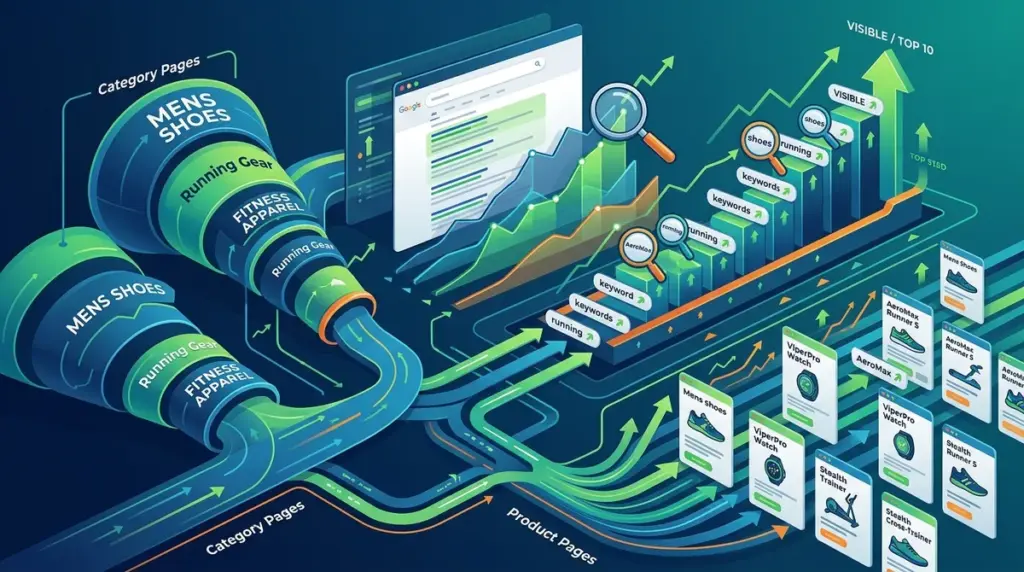
Ecommerce rank tracking fails when category and product data are lumped into a single bucket. For a store with 5,000 SKUs, a 2-position drop in a high-volume category term like "ergonomic office chairs" has a vastly different revenue impact than a 5-position drop for a specific "Steelcase Leap V2 Black Fabric" product page. To drive actual commercial growth, your tracking setup must distinguish between Product Listing Pages (PLPs) and Product Detail Pages (PDPs).
Effective tracking allows you to see whether your SEO efforts are building long-term authority on category hubs or capturing immediate transactional intent on specific items. Without this distinction, your share of voice metrics become skewed by thousands of low-volume product keywords, masking the performance of the high-traffic category drivers that fund your marketing budget.
Distinguishing Intent Between PLPs and PDPs
The first step in a professional ecommerce tracking setup is mapping keyword intent to the correct page template. If you are tracking a broad term against a product page, you are likely fighting a losing battle against Google’s preference for variety on the SERP.
Mapping High-Volume Head Terms to Category Pages
Category pages (PLPs) are designed to satisfy "commercial investigation" intent. Users searching for "wireless headphones" generally want to see a range of brands, price points, and features before committing to a specific model. You should track these head terms exclusively against your category URLs. If your rank tracker shows a product page ranking for these terms, it is often a signal that your category page lacks sufficient internal linking or content depth.
Tracking Long-Tail Specificity on Product Detail Pages
Product pages (PDPs) target "transactional" intent. These keywords are highly specific, often including brand names, model numbers, colors, or sizes—for example, "Sony WH-1000XM5 silver noise cancelling." Tracking these requires a different frequency and focus. While category pages are stable, product pages are volatile due to inventory changes and seasonal refreshes. Tracking PDPs allows you to monitor the "tail" of your search traffic, which often converts at a 2x to 3x higher rate than category traffic.
Implementing URL-Based Segmentation
Manual tagging is unsustainable for stores with deep catalogs. To manage this at scale, use your rank tracker’s filtering and tagging features based on URL patterns. Most ecommerce platforms use a predictable structure, such as /c/ or /category/ for listings and /p/ or /product/ for items.
- Dynamic Tagging: Set up rules that automatically tag any keyword associated with a URL containing "/products/" as "PDP."
- Folder Tracking: Monitor the aggregate performance of the "/collections/" path to see if site-wide technical issues are affecting your top-level navigation pages.
- Brand vs. Non-Brand: Segment product keywords further by brand name to identify which manufacturers are driving your organic revenue and which require more aggressive optimization.
Pro Tip: Monitor the "Ranked URL" column in your reports weekly. If a product page displaces a category page for a broad search term, Google is signaling that your category page is underperforming. Instead of trying to force the product page higher, use it as a cue to improve the category page’s UX or internal link equity.
Analyzing Performance by Page Type
Once your keywords are segmented, you can analyze the "Search Volume vs. Ranking" relationship more accurately. Category pages often have high search volume but lower conversion rates, acting as the top of your funnel. Product pages have lower volume but higher conversion rates, representing the bottom of the funnel.
Best for Category Pages: Focus on Share of Voice (SoV) and average position. Because these pages compete for high-traffic terms, even a move from position 5 to position 3 can result in thousands of additional visitors per month. Use these metrics to justify investments in category-level content and backlink acquisition.
Best for Product Pages: Focus on "Ranking Distribution" and "Click-Through Rate (CTR)." Since PDPs often rank for very specific terms, you want to see a high percentage of these keywords in positions 1-3. If a product page is in position 6 for its own specific model name, your technical SEO (likely Schema markup or page speed) is failing you.
Identifying and Fixing Internal Competition
Keyword cannibalization is the silent killer of ecommerce rankings. This occurs when multiple product pages or a product and a category page compete for the same keyword. In a rank tracker, this appears as "URL flipping," where the ranking URL for a keyword changes frequently between two or more pages.
To solve this, use your tracking data to identify which page Google "prefers." If a specific product page consistently outranks the category page for a general term, consider whether that product is the "hero" of that category. If it isn't, you should strengthen the category page’s SEO and perhaps use a canonical tag or adjust internal anchor text to point back to the category hub.
Monitoring Seasonal and Inventory Shifts
Ecommerce is rarely static. Products go out of stock, and categories shift with the seasons. Your tracking strategy must account for this fluidity. When a product goes out of stock, its rankings will naturally decay. If you are tracking 500 products that are currently unavailable, your "Average Position" metric will drop, creating a false alarm for your SEO health.
Filter your tracking reports to exclude out-of-stock items to get a "clean" view of your active inventory’s performance. Conversely, for category pages, tracking should be perpetual. Even if a category is out of season (e.g., "winter coats" in July), maintaining a baseline view of those rankings ensures you aren't losing ground to competitors who are building year-round authority.
Building Your Ecommerce Tracking Framework
To move from basic monitoring to strategic growth, execute the following steps in your tracking environment. First, audit your current keyword list and assign every term to either a Category or Product tag based on the URL structure. Second, set up automated alerts for "URL changes" on your top 100 highest-volume keywords to catch cannibalization early. Third, create separate dashboards for "Category Health" and "Product Performance."
By isolating these two distinct page types, you stop reacting to meaningless fluctuations and start identifying which parts of your site are actually driving the bottom line. This granular visibility allows you to allocate your SEO resources—whether that’s content updates for categories or technical fixes for product pages—where they will have the most immediate impact on revenue.
Frequently Asked Questions
Should I track every single product page on my site?
No. For large catalogs, track your top 20% of products by revenue, high-margin items, and new arrivals. Tracking every SKU often leads to "data noise" that makes it harder to see significant trends. Use category-level tracking to monitor the health of the remaining 80%.
What do I do if a product page is outranking my category page?
Check the intent of the keyword. If the keyword is specific, the product page should rank. If the keyword is broad, your category page likely needs more internal links or better "at-a-glance" information. Do not delete the product page; instead, optimize the category page to be a better resource.
How often should I check ecommerce rankings?
For high-volume category terms, daily tracking is necessary to spot competitor moves or algorithm shifts. For product pages, weekly tracking is usually sufficient unless you are running a major promotion or a product launch where immediate visibility is critical.
How do I handle tracking for products that have multiple variants (color, size)?
Track the "parent" URL. In most ecommerce setups, variant pages (like /product-red/ or /product-blue/) should be canonicalized to a single main product page. Tracking the main URL provides the most accurate reflection of your search visibility without duplicating your keyword count.